


Idaho Statesman: Boise ID News
2.485.00 Reviews
App Specs
- Version
- 11.1.16
- Updated On
- License
- Free
- Downloads
- 10,000+
- Developer
- McClatchy
- Categories
- News & Magazines
- Platform
- Android
Screenshots
 Analysis by AppCompare
I think the Idaho Statesman - Boise News app makes the most sense when you want a regular, local view of Boise rather than a stream dominated by national headlines. It brings news, sports, weather and community coverage into one place, which can be useful when you want to understand what is happening nearby without hopping between several sources. I would treat it as a focused local-news companion, though, not as a perfect replacement for every news app or for checking official weather and emergency information.
A local lens for everyday reading
The app is a free news and magazines app from McClatchy, and its focus is firmly on Idaho. That local emphasis is its clearest reason to install it: someone living in Boise, following the area from elsewhere, or trying to keep up with local decisions may find its coverage more relevant than a general headline feed. It has been available since December 27, 2011, and version 11.1.1 is the current version. Those details tell me this is an established publication app, although longevity alone does not guarantee that every reading session will feel smooth.
I would start by deciding what I want from a local news app. If my main interest is a quick glance at regional headlines, this gives me a dedicated place to look. If I need a broad view of national and international events, I would pair it with a general news source instead. The distinction matters: a publication with a strong local identity can offer useful context about Boise, but it is not automatically the best single app for every kind of news.
What Makes Idaho Statesman - Boise News Stand Out?
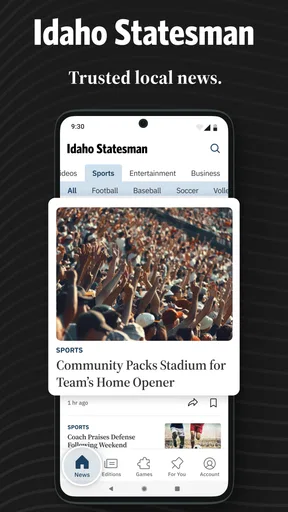
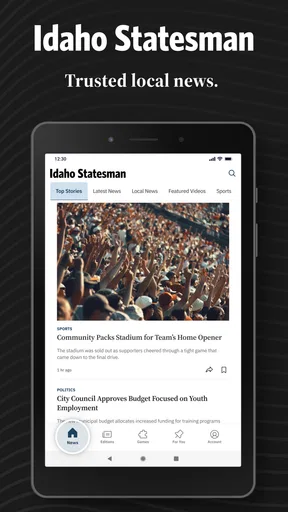
First off, if you’re a news junkie like me, you’ll appreciate the ease of accessing the latest stories right at your fingertips. The Idaho Statesman - Boise News app is designed to give you a seamless experience, with its intuitive layout and user-friendly interface. It’s like having a digital newspaper in your pocket, minus the ink stains. I love how the app opens up to a neat homepage with the top headlines. You can easily scroll through the day's most important stories without getting overwhelmed.
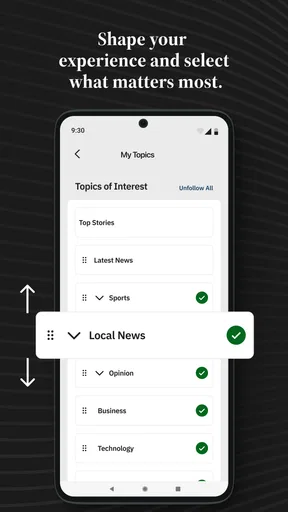
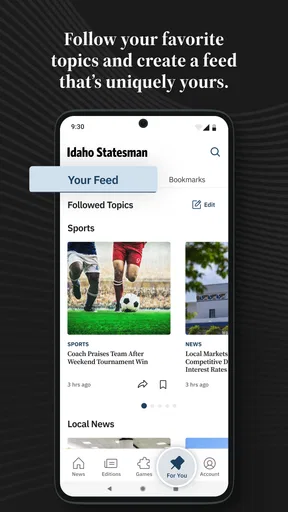
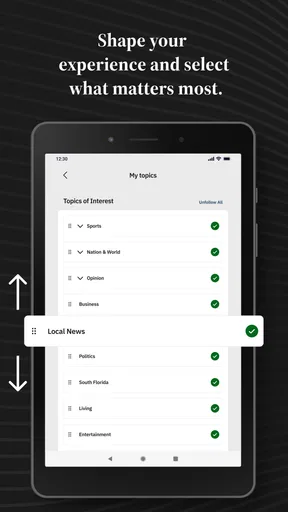
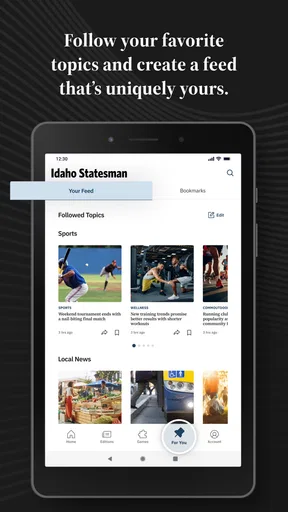
One of the coolest features is the “My News” section. You can personalize your feed based on your interests. Whether you’re into local sports, politics, or community events, this app tailors the news just for you. It's like having your own personal news editor, always at the ready.
Making “My News” work for you
Personalization is most useful when it saves time without narrowing your view too much. I would use “My News” to bring recurring interests—such as local politics or sports—closer to the top, then still check the main headlines occasionally. A customized feed can make a short lunch-break catch-up easier, but relying on it alone may mean overlooking a story outside the topics I chose. For a balanced routine, I’d treat it as a shortcut, not a filter that decides what matters.
A practical way to use the app is to separate quick checks from deeper reading. I might scan the homepage in the morning, save a longer read for a quieter moment, and return to the local section when a story affects my neighborhood or plans. That habit makes a local publication more useful than opening it only when a major event is already trending elsewhere.
Worth Reading Before You Choose

EA SPORTS FC Mobile 26 Is a Bigger Football Game, but It Takes Time

Flipboard Shows What News Apps Must Do Beyond the Feed

Switching to Android Auto Means Rethinking Your Driving Routine

Google Calendar Makes a Crowded Week Easier to Manage

Ludo King Makes the Most of the Minutes Between Plans

Baby Panda World Brings Quick Play to Modern Phones, but Its Game Library Feels Busy
In-Depth Coverage and Multimedia Experience
What really sets the app apart is its in-depth coverage. Each article is detailed, giving you the full story without leaving you with more questions than answers. Plus, it's not just about words. The app incorporates a rich multimedia experience with photos, videos, and even podcasts. So, if you’re in the mood to watch a video on the latest Boise State football game instead of just reading about it, you’re covered. This dynamic approach keeps the content fresh and engaging.
Choosing the right format for the moment
Those different formats suit different routines. Reading is easier when I want to pause, skim back, or check a detail; audio can fit a walk or household task, while video is better when images add something to a sports or community story. I would not assume every story is available in every format, so I’d choose based on what the app actually offers for that particular item. The useful point is having more than one way to engage, rather than expecting multimedia to replace careful reporting.
Compared with a social feed, a publication app can make it easier to follow a coherent report instead of encountering fragments, reactions, and reposts in no clear order. Compared with a broad news aggregator, its advantage is a Boise-centered editorial focus; the trade-off is that a reader seeking a wide mix of national coverage may need another source alongside it. I see that as a matter of fit rather than a flaw: this app is strongest when local context is the reason I opened it.
Stay Updated with Push Notifications
If you’re someone who likes to stay in the loop, the push notifications are a game-changer. You can customize them, so you’re only alerted about the news that matters to you. Want to know when there’s breaking news or a big event in Boise? Just set your preferences, and you’ll get real-time updates. It's like having a friend who’s always in the know, keeping you informed without being intrusive.
However, I’ll admit, sometimes the notifications come a little too often. But hey, better to be over-informed than out of the loop, right?
Keeping alerts useful rather than noisy
In practice, I would be selective about which alerts I allow. A phone that buzzes for every passing development can make important messages easier to miss, so I’d begin with only the subjects I genuinely want to follow and adjust if the interruptions become tiring. If I’m busy or trying to concentrate, muting alerts and checking the app at a chosen time is a reasonable alternative. The app can help bring urgent local coverage to me, but it should not dictate how often I interrupt my day.
For weather, I’d use the app as a convenient place to see local updates while reading the news, then turn to a dedicated forecast or official alert source when a decision depends on precise conditions. That distinction is especially practical when planning a commute or outdoor activity: a news app adds local context, while a specialist weather service is often the better tool for checking conditions directly.
Community Connection
Another highlight is the community focus. The app doesn’t just cover big national stories; it zeroes in on what’s happening right in your backyard. From local government decisions to community events, it’s all about keeping you connected to your surroundings. The “Local” section in the app is filled with stories that matter to the Boise community, making it a valuable resource for residents.
Who will get the most from it?
I’d recommend it most to Boise-area readers who want local reporting in their regular routine, people with a continuing interest in Idaho, and former residents who want a way to keep an eye on the place. A newcomer could also use local coverage to become more familiar with community issues and events, rather than relying only on word of mouth or broad regional headlines. For those readers, the publication’s local focus is more valuable than an endless menu of unrelated topics.
It is less compelling for someone who wants a single app to cover every region and subject, or for a reader who rarely follows local news. If I were mainly looking for national breaking headlines, a broad news service would be a better first stop. And if I only needed weather, I would choose a dedicated weather app. The right choice depends on whether Boise coverage is a regular need or an occasional curiosity.
Easy Navigation and Accessibility
Navigating through the app is a breeze. The clean design and organized categories mean you can find what you’re looking for without any hassle. Whether you’re searching for a specific topic or just browsing, it’s all straightforward. Also, for those who prefer reading in dark mode, the app has got you covered. It’s a small feature, but it’s a nice touch for those late-night reading sessions.
Practical considerations before settling in
The app is free to download, but it includes in-app purchases ranging from $7.99 to $159.99 per item. I would check the purchase details on the screen before committing, especially if I only want occasional access or am installing it for a family member. The presence of paid items means “free” does not necessarily describe every way of using the publication. For a casual reader, it is sensible to explore the experience first and make a purchase only if the terms suit the way they plan to read.
Its audience rating is Everyone 10+, and the app has a 2.3 average from 184 ratings, with 85 written reviews. It has 10K+ installs. I would take the low average as a reason to approach it with realistic expectations rather than assume the experience will work equally well for everyone. Ratings can reflect different devices, expectations, or experiences over time, so I would test the navigation and reading flow on my own phone before making it part of a daily routine.
One useful habit is to avoid treating any single report as the whole picture when a local story is developing. I’d read the article for its reporting and context, then check an official source when I need an authoritative instruction, such as a public notice or service update. That is not a knock on the app; it is a sensible boundary between journalism and the agencies responsible for direct public information.
Final Thoughts
All in all, the Idaho Statesman - Boise News app is a fantastic tool for staying informed about everything Boise. It’s comprehensive, easy to use, and offers a personalized experience that makes consuming news enjoyable. Whether you’re a Boise local or just someone interested in what’s happening in the area, this app is definitely worth checking out. So, if you haven’t already, give it a download and dive into the world of Boise news.
Remember, staying informed keeps us connected, and this app does just that. Happy reading!
My verdict is positive with a clear qualification: I would keep it if local Idaho reporting is something I check often, and I would judge it by whether its mix of headlines, topic choices, alerts, and formats fits my own routine. I would not install it expecting a universal news desk or a substitute for specialist services. Used for what it does best—keeping Boise and Idaho closer to hand—it has a distinct purpose; if that local perspective is not important to you, a broader alternative will likely be a better match.
Pros
- Comprehensive local news coverage.
- User-friendly interface and navigation.
- Timely updates on breaking news.
- Customizable notification settings.
- Offline reading mode available.
Cons
- Limited national and global news.
- Frequent pop-up ads can be intrusive.
- Occasional slow loading times.
- Some features require subscription.
- Limited multimedia content options.
FAQs for Idaho Statesman: Boise ID News
What features does the Idaho Statesman - Boise News app offer?
The Idaho Statesman - Boise News app provides users with up-to-date news coverage, including local and national headlines, sports updates, and weather forecasts. Additionally, it offers multimedia content such as videos and photo galleries, along with personalized notifications to keep users informed about breaking news in real-time.
Is the Idaho Statesman app free to use?
The app is free to download and offers some content at no charge. However, to access premium articles and exclusive features, users may need to purchase a subscription. The app provides various subscription plans, allowing users to choose the one that best fits their needs to enjoy full access.
How user-friendly is the interface of the Idaho Statesman app?
The Idaho Statesman app boasts a user-friendly interface designed for easy navigation. With a clean layout and intuitive menu, users can swiftly browse through different sections such as news, sports, and opinion pieces. The app also allows for customization of news feeds, making it simple for users to focus on their preferred topics.
Does the Idaho Statesman app offer offline reading?
Yes, the app supports offline reading, which allows users to save articles to read later without an internet connection. This feature is particularly useful for those who are on the go or in areas with limited connectivity, ensuring that users can stay informed at their convenience.
What are the device compatibility requirements for the Idaho Statesman app?
The Idaho Statesman app is compatible with both Android and iOS devices. It requires Android version 5.0 or higher and iOS version 11.0 or later. Regular updates are provided to enhance functionality and ensure security, so having the latest OS version is recommended for the best experience.


